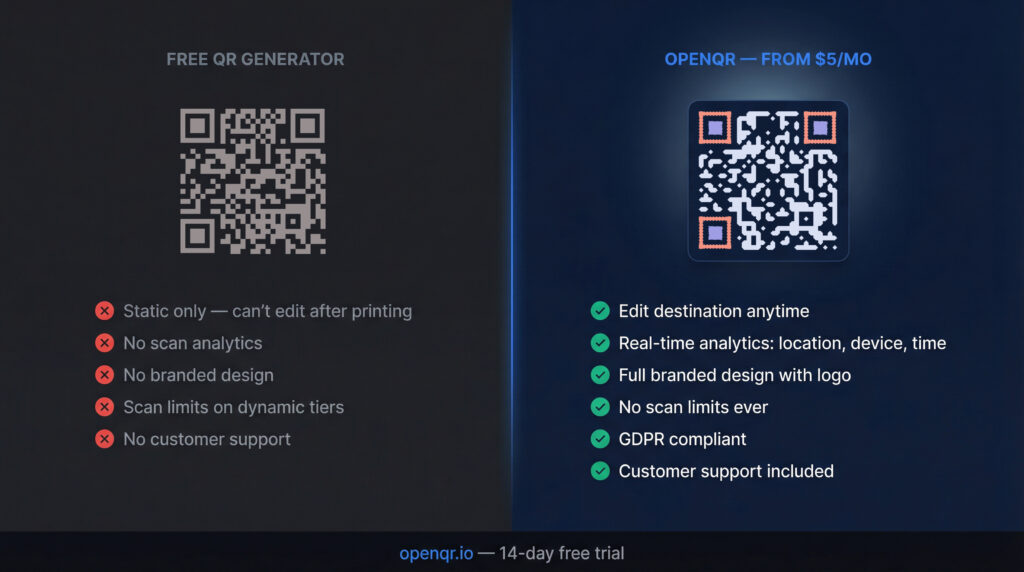
There are dozens of free QR code generators available in 2026. For simple, one-off personal use they work perfectly fine. For business use, the hidden costs of going free are almost always higher than the price of a paid plan.
This guide gives you a completely honest answer. We will explain exactly what free tools can and cannot do, where they introduce real risk, and which situations genuinely justify a paid plan. We cover both sides fairly because the right answer depends entirely on what you are trying to do.
- Free QR code generators are fine for personal, one-off, or low-stakes use where the destination will never change and tracking is not needed.
- For any business use involving printed materials, marketing campaigns, or customer-facing codes, a paid plan is almost always worth it.
- The main limitations of free tools: static only (no editing after print), no analytics, scan limits, codes tied to subscription status, and potential data privacy risks.
- Free dynamic QR codes do exist but come with restrictions: typically 1 to 5 codes, basic or no analytics, and codes that may stop working if the provider shuts down or you do not upgrade.
- OpenQR’s paid plan starts at $5/month with a 14-day free trial. For most businesses that is less than the cost of a single reprint job.
- The right question is not “free or paid” but “what happens when something changes?” If your code needs to keep working and keep being tracked, you need a paid dynamic plan.
- What You Actually Get With a Free QR Code Generator
- The Hidden Costs of Free QR Codes
- Free Dynamic QR Codes: What to Know
- Full Feature Comparison: Free vs Paid
- When Free Is Genuinely the Right Choice
- When You Need a Paid Plan
- Decision Guide: Which Option Fits Your Situation
- Privacy and Security: What Free Tools Do With Your Data
- Frequently Asked Questions
1. What You Actually Get With a Free QR Code Generator
Most free QR code generators give you a working code quickly and without any payment. For static codes especially, tools like OpenQR or QR Code Monkey are reliable, produce high-quality SVG and EPS outputs, and generate codes that will work forever as long as the URL they point to stays live.
Here is what a good free tool typically includes:
- Unlimited static QR code generation with no expiry
- Basic design customization: colors, logo upload, corner styles
- SVG, PNG, and sometimes EPS export
- Support for multiple content types: URL, text, WiFi, email, phone
- No account required for basic generation
And here is what almost every free tool leaves out:
- The ability to edit the destination after the code is printed
- Any scan tracking or analytics
- Real-time scan data: location, device, time
- Branded frames with custom call-to-action text
- Customer support when something goes wrong
The most common mistake businesses make is treating a QR code as a one-time technical task rather than an ongoing marketing asset. They use a free tool, print the code on packaging or signage, and then discover six months later that they cannot update the destination, cannot see how many people have scanned it, and cannot fix anything without reprinting everything.
2. The Hidden Costs of Free QR Codes
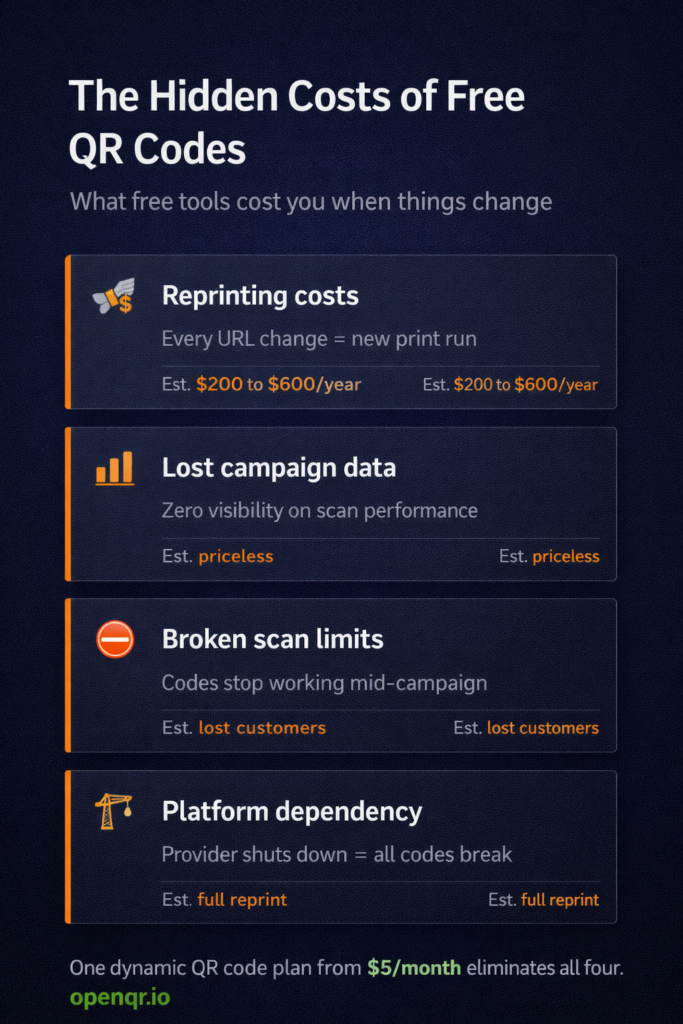
Free QR generators are free at the point of creation. The costs show up later, and they are often larger than the subscription fee you were trying to avoid.
Reprinting costs
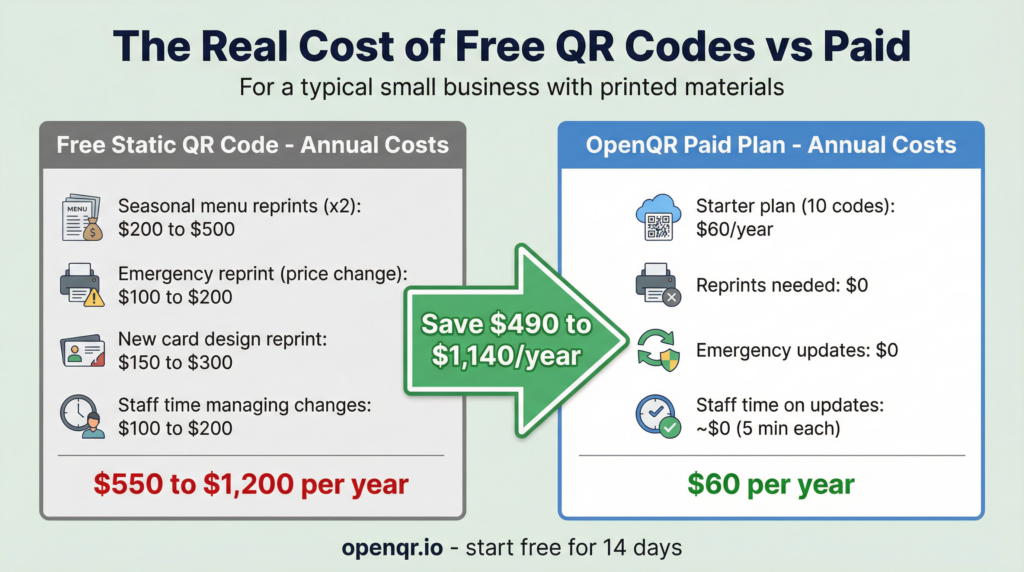
A static QR code encodes the destination URL permanently. The moment that URL changes, every printed code that carries it is broken or pointing to the wrong place. For a business that changes its website, runs seasonal promotions, or updates its menu, this means regular reprint costs. A restaurant reprinting table tents twice a year spends more on those reprints than an annual OpenQR subscription costs. The same logic applies to product packaging, business cards, and any other printed material carrying a static code.
Lost engagement you cannot measure
Free static codes have zero analytics. You have no idea how many people have scanned your code, where they were, what device they used, or whether the scan led to any action. For a marketing campaign, a product launch, or a restaurant menu, this is not just inconvenient. It means you cannot prove ROI, cannot optimize placement, and cannot learn anything from the campaign to improve the next one. The invisible cost of not knowing is real.
Scan limits on free dynamic tiers
Several platforms offer free dynamic QR codes but cap the number of scans. Once you hit that cap, your codes will stop working and require an upgrade to keep the destination active. A code that stops working mid-campaign, mid-event, or mid-product run is worse than one that never worked at all. Customers who scan a broken code do not try again. They move on.
Platform dependency risk
Free dynamic codes route through the provider’s redirect server. If the platform you used to generate it goes out of business, the QR code may break. For long-lived printed materials, this is a genuine risk. A paid subscription gives you a commercial relationship with contractual obligations. A free tool gives you nothing if the service disappears.
3. Free Dynamic QR Codes: What to Know
Free dynamic QR codes do exist in 2026. Flowcode offers 2 dynamic codes on its free plan with no scan limits. Bitly allows 2 dynamic QR codes per month on the free tier. Some lesser-known platforms offer more codes free, but with significant restrictions.
Here is an honest assessment of free dynamic options:
| Platform | Free Dynamic Codes | Free Analytics | Scan Limit | Codes Expire? |
|---|---|---|---|---|
| Flowcode | 2 codes | Limited | No limit | No |
| Bitly | 2 per month | Limited | No limit | No |
| QR Tiger | Free trial only | Trial only | Yes – strict cap | Yes if you hit cap |
| QR Code Monkey | None – static only | None | No limit | No (static) |
| OpenQR (paid from $5/mo) | 10 to 500 codes | Full real-time | No limit | Never |
If you genuinely only need 1 or 2 dynamic QR codes for a low-stakes use case, Flowcode’s free plan is a legitimate starting point. The moment you need more than 2 codes, real analytics, or branded design, a paid plan at $5/month delivers more value than any free tier on the market.
4. Full Feature Comparison: Free vs Paid
| Feature | Free Tools (e.g. QR Code Monkey) | Free Dynamic Tier (e.g. Flowcode) | OpenQR Paid from $5/mo |
|---|---|---|---|
| Edit destination after printing | ❌ Static only | ✅ Yes (2 codes) | ✅ Yes (10 to 500 codes) |
| Real-time scan analytics | ❌ None | ⚠️ Very limited | ✅ Full: location, device, time |
| Scan limits | ✅ No limit | ✅ No limit (Flowcode) | ✅ No limit |
| Branded design with logo | ✅ Basic | ⚠️ Limited on free | ✅ Full customization |
| SVG export for print | ✅ Yes | ⚠️ Sometimes | ✅ Always |
| Codes never expire | ✅ Static codes | ✅ Flowcode yes | ✅ Always |
| GDPR compliant | ⚠️ Varies by tool | ⚠️ Partial | ✅ Full, no IP storage |
| Customer support | ❌ None | ⚠️ Limited | ✅ Yes |
| API access | ❌ No | ❌ No | ✅ Yes |
| PDF hosting (no website needed) | ❌ No | ❌ No | ✅ Yes |
| Monthly cost | $0 | $0 | From $5/month |
5. When Free Is Genuinely the Right Choice
Free QR code generators are not always the wrong answer. There are clear situations where they are exactly right.
✅ Free works well when:
- You need a one-off personal code (WiFi password for home, personal website link)
- The destination URL will never change
- You do not need to track how many times it is scanned
- It is for a short-lived, low-stakes use (a personal event, a one-day activity)
- You are testing QR codes for the first time before committing to a tool
- You need static codes for internal use only (storage labels, internal docs)
💼 Paid is worth it when:
- The code will appear on printed materials that will be used for months
- You need to update the destination after printing (menu, pricing, URL change)
- You want to track scans for any marketing or business purpose
- The code is customer-facing and represents your brand
- You need dynamic codes
- GDPR compliance matters for your audience
The honest summary: free tools are built for individuals with simple, permanent needs. Paid plans are built for businesses with changing content, professional standards, and a need to measure results.
6. When You Need a Paid Plan
These are the scenarios where using a free tool creates real business risk.
Any printed material with a long lifespan
Restaurant menus, product packaging, business cards, brochures, signage, and banners all have one thing in common: they get printed in bulk and used for months or years. A static QR code on any of these is a liability. The first time your URL, phone number, or menu changes, you have a reprint problem. A paid dynamic code from OpenQR costs $5/month and eliminates that risk permanently.
Marketing campaigns where you need to prove ROI
If you are spending money on print advertising, event materials, or product packaging, you need to know whether those QR codes are being scanned. Free tools give you nothing. A paid plan gives you analytics: total scans, unique scans, location data, device breakdown, and time of scan. That data is how you prove the campaign worked and improve the next one.
Customer-facing codes on behalf of your brand
A QR code that stops working, points to a broken page, or shows signs of tampering reflects on your brand, not on the tool that generated it. Paid platforms come with contractual obligations, uptime commitments, and customer support. Free tools come with none of that. For any customer-facing use, the reputational risk of a free tool failing outweighs its cost savings.
Multiple codes across different campaigns or locations
Free dynamic tiers cap you at 2 codes. A restaurant with 20 tables, a retail brand running 3 concurrent campaigns, or a business with multiple locations needs more. OpenQR’s Starter plan gives you 10 codes for $5/month. The Life plan gives you 50 for $11/month. That is a straightforward business decision.
7. Decision Guide: Which Option Fits Your Situation
| Your Situation | Best Option | Why |
|---|---|---|
| Personal WiFi code, home use | Free static (OpenQR or QR Code Monkey) | Never changes, no tracking needed |
| One-off event, fixed URL, no tracking | Free static | Short lifespan, destination fixed |
| Testing QR codes for the first time | Flowcode free or OpenQR trial | Zero cost to validate the concept |
| Restaurant menu on table tents | OpenQR Starter ($5/mo) | Menu changes frequently, tracking peak times |
| Business card QR code | OpenQR Starter ($5/mo) | Details will change, scan tracking for follow-up |
| Product packaging | OpenQR Starter ($5/mo) | Long print run, destination may change, tracking needed |
| Marketing campaign with multiple codes | OpenQR Life ($11/mo) | 50 codes, full analytics per code, A/B testing |
| Any customer-facing business use | Paid dynamic (OpenQR) | Tracking, editing, reliability, brand safety |
8. Privacy and Security: What Free Tools Do With Your Data
This is the least-discussed aspect of free QR generators, and it matters for businesses with customer-facing codes.
When you create a dynamic QR code on a free tool, two things happen. First, you upload your destination content (a URL, a PDF, your contact details) to their servers. Second, their redirect infrastructure sits between every scan and your destination. That gives the provider access to your content and to the scan data generated by your audience.
Payments obligate companies to provide some level of security and support, including official terms of service and rigorous privacy policies. Contractual obligations generate reliability and protection. Using a free QR code generator gives you none of that.
Specific risks with free dynamic tools:
- Data selling: Some free platforms monetize by selling aggregated scan data and user behavior to marketing companies. This is typically disclosed in terms of service that most users do not read.
- Redirect manipulation: A provider could theoretically change where a dynamic code redirects. With a free tool, you have no contractual protection against this.
- No GDPR documentation: If your audience includes EU visitors, you need to know exactly how scan data is processed and stored. Free tools rarely provide this documentation at the level GDPR requires.
OpenQR does not store user IP addresses. All location data is aggregated and anonymized. The platform is explicitly GDPR and CCPA compliant, with documented data processing practices. That is the level of assurance a business needs from any tool sitting in the path of customer interactions.
Branded QR codes are more trusted by users in 2026. A code with your logo embedded, your colors applied, and a recognizable domain in the frame signals authenticity. An unbranded black-and-white code on a business card or product does not. Branding is not just aesthetic. It reduces the hesitation that has developed as awareness of QR-based phishing has grown.
Frequently Asked Questions
Are free QR code generators safe to use?
For static codes from reputable tools like QR Code Monkey, yes. The codes they produce are standard QR codes following the ISO 18004 specification. The risk with lesser-known free generators is not safety but reliability: some insert their own redirect URLs that could change or disappear. For dynamic codes on free platforms, the risk is higher because your content and your customers’ scan behavior pass through their servers. Always read the privacy policy of any free dynamic tool before using it for business purposes.
Do free QR codes expire?
Free static QR codes do not expire. The URL is encoded directly in the pattern and will work forever as long as the destination URL remains live. Free dynamic codes are more complex: the code itself does not expire, but if the free platform shuts down or you hit a scan cap without upgrading, the redirect stops working and every printed code becomes non-functional.
Can I get free QR codes with analytics?
Basic analytics are available on some free dynamic tiers in 2026. Bitly’s free plan includes limited scan data alongside QR codes. Flowcode’s free tier gives 2 dynamic codes but restricts analytics depth. Full real-time analytics including geographic location, device breakdown, time of scan, and trend data are features of paid plans. OpenQR’s 14-day free trial gives you full analytics access before any payment.
What is the best free QR code generator in 2026?
For static codes: OpenQR or QR Code Monkey. It produces unlimited free static codes with no expiry, supports SVG, allows logo customization, and does not require an account. For free dynamic codes: Flowcode, which offers 2 dynamic codes with no scan limits on its free plan. For any business use requiring more than 2 codes or real analytics, OpenQR’s paid plan from $5/month is the better value.
Is the OpenQR free trial actually free?
Yes. OpenQR’s 14-day free trial gives you access to full paid features including dynamic QR codes, analytics, branded design, and SVG export. No credit card is required to start. After 14 days, you choose a paid plan or your account downgrades. Any codes created during the trial remain active on the paid plan.
How much does a paid QR code generator actually cost?
OpenQR starts at $5/month for 10 dynamic QR codes with full features. That is $60/year. A single avoided reprint job on table tents or business cards typically costs more than that. Bitly starts at $8/month. Uniqode starts at $15/month for enterprise features. For most small businesses, the $5 to $11/month range covers everything needed.
Try OpenQR Free for 14 Days
Full dynamic QR codes, real-time analytics, branded design, and non-expiring codes. No credit card needed to start.