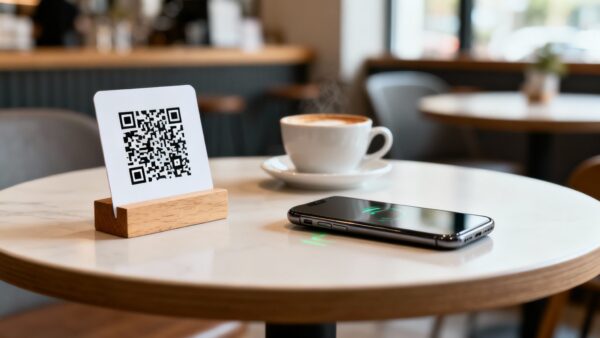
Paper menus are expensive, unhygienic, and out of date the moment they’re printed. QR code menus solve all three problems at once – and in 2026, they’ve become the standard, not the exception.
This guide is for restaurant owners, café operators, bar managers, and hospitality professionals who want to implement QR code menus properly – or upgrade a basic setup into something that drives real revenue.
By the end, you’ll know exactly how to create, design, place, and manage a restaurant QR code menu using OpenQR – and how to use it for more than just showing a menu.
- 75% of restaurants worldwide now use QR codes for digital menus in 2026 (Menu Miami, 850+ restaurants).
- Restaurants using QR code payments report a 15% increase in table turnover (TableQR ROI Report, 2026).
- Digital menus drive up to 60% higher average order value through natural upselling (Scanova, 2025).
- Medium-sized restaurants save over $5,000/year in printing costs after switching to QR menus (Scanova).
- Always use dynamic QR codes – they let you update your menu without reprinting table tents or stickers.
- Table-mounted codes account for 60% of all restaurant scans – the single highest-performing placement.
- OpenQR’s PDF QR code is the fastest way to go live with a digital menu today – free trial, no credit card.
- Why QR Code Menus Are Essential in 2026
- Static vs Dynamic QR: Why It Matters for Restaurants
- How to Create a Restaurant QR Code Menu (Step-by-Step)
- Where to Place QR Codes in Your Restaurant
- Design & Best Practice Tips
- Beyond the Menu: 7 More Ways Restaurants Use QR Codes
- Cost Savings: What Restaurants Actually Save
- 5 Common Mistakes to Avoid
- Frequently Asked Questions
1. Why QR Code Menus Are Essential in 2026
QR code menus crossed from “popular option” to “industry standard” well before 2026. But this year marks a new phase: restaurants that adopted QR codes during the pandemic are now using them strategically – not just to show a menu, but to drive orders, collect data, and build loyalty.
The shift is consumer-driven as well as operator-driven. 59% of smartphone users now scan QR codes daily – scanning is no longer a novelty that requires instruction. It’s second nature. And 9 in 10 diners now scan QR codes weekly in restaurants, making it the primary touchpoint between guests and your offering (Modern Restaurant Management, January 2026).
The business case is just as compelling. Restaurants using QR code systems see up to 60% increases in average order value – because digital menus make upselling feel natural, not pushy. Customers browse at their own pace, see photos and descriptions, and add extras without feeling pressured by a server hovering nearby.
✅ The 2026 mindset shift: QR codes are no longer just a menu delivery mechanism. As Modern Restaurant Management put it in January 2026, they’ve become “the new front door for most restaurants – the first real interaction guests have once they sit down.” Operators who treat every scan as a data point and engagement opportunity are pulling ahead of those who simply uploaded a PDF and moved on.
But here’s what still trips up many restaurants: using the wrong type of QR code.
2. Static vs Dynamic QR: Why It Matters for Restaurants
Not all QR codes are created equal – and in a restaurant context, the difference between static and dynamic is the difference between a QR code tool that works for you and one that will cost you money. To better understand the differences, read our free vs paid QR code generator guide.
| Feature | Static QR Code | Dynamic QR Code |
|---|---|---|
| Update menu without reprinting | ❌ Impossible | ✅ Instant, from dashboard |
| Change daily specials | ❌ Requires new code + reprint | ✅ Update in seconds |
| Track scans & peak times | ❌ No analytics | ✅ Full analytics included |
| Branded design with logo | Limited | ✅ Full customization |
| Code expires or breaks | If URL changes – yes | ✅ Never with OpenQR |
| Cost | Free | From $5/month (OpenQR) |
| Right choice for restaurants | ❌ | ✅ Always |
The key issue for restaurants is that menus change constantly – prices shift, seasonal dishes rotate, daily specials appear and disappear, items sell out. A static QR code encodes the destination permanently at creation. Any change to your menu URL means every printed code is broken and must be reprinted.
A dynamic QR code from OpenQR solves this entirely. You update the linked menu in your dashboard – the code on every table, sticker, and window stays exactly the same, and it automatically points to the updated content.
💡 Real cost example: A restaurant with 30 tables reprints table tents twice a year = ~$240–$600 in print costs, plus staff time. With a dynamic QR code at $5/month ($60/year), every menu update is free and instant. The savings in year one alone more than cover the full annual plan cost.
3. How to Create a Restaurant QR Code Menu (Step-by-Step)
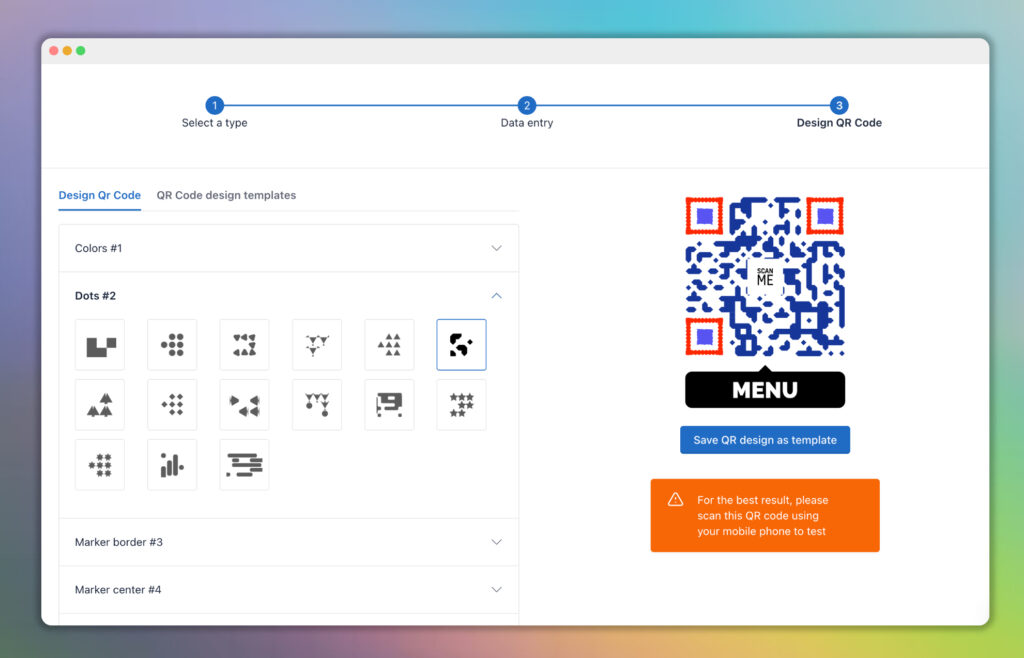
Creating a restaurant QR code menu with OpenQR takes under 5 minutes. Here’s the complete process:
You have two good options. PDF menu Export your menu as a PDF from any design tool (Canva, Adobe, Word). This is the most popular format – it looks exactly like your printed menu and requires no website. URL if you have a mobile-optimized menu page on your website, use that URL instead. URL menus allow richer features like photos per dish, filtering by dietary need, and direct ordering integrations.
Go to openqr.io and start your free 14-day trial. Choose PDF QR Code if you’re using a PDF menu, or URL QR Code if you’re linking to a website page. Both are fully dynamic – editable at any time after printing.
For PDF upload your menu file directly into OpenQR. It’s stored securely – no need for a website or hosting. For URL: paste your menu page link. Either way, this is your starting destination and can be swapped for an updated version at any time without changing the QR code.
This step is worth the extra 2 minutes. Using OpenQR’s design editor: add your restaurant logo in the center, apply your brand colors to the dots and frame, and add a call-to-action frame with text like “Scan to view menu” or “Scan to order.” Branded QR codes earn significantly more scans – and a code that matches your restaurant’s visual identity feels intentional, not like an afterthought.
Always download as SVG for anything you’re printing. SVG is infinitely scalable – it looks sharp on a small table tent card or a large window sticker at any size, with no pixelation. If your printer needs PNG, request the highest resolution available (300dpi minimum). Never use a low-res PNG for print.
Scan your QR code with an iPhone AND an Android device. Confirm the menu opens correctly on both, displays well on mobile, and loads within 2–3 seconds. Test the minimum print size you plan to use (2cm × 2cm is the smallest recommended for table use). Fix any issues now – before you’ve printed 50 table tents.
Deploy your QR codes on table tents, stickers, or printed cards. From the moment the first guest scans, your OpenQR dashboard logs the data: total scans, peak scan times, device types, and geographic location. Use this data to understand your busiest service windows and optimize accordingly.
✅ Updating your menu later: Log in to your OpenQR dashboard, find your QR code, click Edit, upload the new PDF or update the URL, and save. Every table in your restaurant now shows the updated menu – immediately, with zero reprinting. This is the core operational advantage of dynamic QR codes.
4. Where to Place QR Codes in Your Restaurant
Placement has a measurable impact on scan rates. Data from 850+ restaurants on the Menu Miami platform gives clear guidance on what works best in 2026.
| Placement Location | % of Total Scans | Best For |
|---|---|---|
| Table tent / table card | 60% | Menu access, ordering, payment |
| Window / entrance sticker | 25% | Pre-visit browsing, takeaway orders |
| Counter / LED display | 10% | Quick-service, café counters |
| Printed on receipt | ~5% | Reviews, loyalty sign-up, social follow |
| All locations combined | +35% more scans vs single placement | Full coverage strategy |
Placement tips that make a measurable difference
- Table tents with “Scan for Menu” text increase scan rates by 35% vs a code with no label (Menu Miami, 2025)
- Server mentions (“You can scan the QR code to view our menu”) increase scan rate by 50%
- Larger, more visible codes get 25% more scans – don’t miniaturize to save space
- Window placement captures walk-by traffic and allows potential guests to view the menu before they commit to entering
- Receipt placement is underused but powerful – it’s the moment guests are most open to leaving a review or joining a loyalty program
💡 Peak scan timing: 45% of daily restaurant QR scans happen during dinner service (5PM–9PM), with 35% during the lunch rush (Supercode, 2026). Schedule any menu updates or promotional changes before these windows to ensure your best content is live during peak engagement.
5. Design & Best Practice Tips
Design principles
- Minimum size: 2cm × 2cm for table use. For window stickers, go larger – at least 6–8cm for comfortable scanning from standing distance
- High contrast is essential – dark code on a white or light background scans fastest and most reliably. Never place codes over photos or dark backgrounds
- Add your logo – it builds trust and signals that the code is official and intentional, not spam
- Include a frame with CTA text – “Scan to view menu,” “Scan to order,” or “Scan for today’s specials” – ambiguity kills scan rates
- Keep the area around the code clear – quiet zone of at least 4 modules (the small squares at corners) on all sides
Mobile experience – don’t neglect the other side of the scan
Your QR code is only as good as what it opens. Make sure your menu is:
- Mobile-optimized – readable on a 5–6 inch screen without zooming
- Fast-loading – under 3 seconds on a typical 4G connection. Compress your PDF if it’s over 5MB
- Up to date – a menu with sold-out items or last season’s prices destroys trust immediately
- Accessible without login – never require an app download or account creation to view a menu
⚠️ The #1 mistake restaurants make: Linking to a menu page that isn’t mobile-optimized. If your menu opens as a desktop website that requires pinching and zooming on a phone, you’ve failed the guest experience at the most critical moment. Always test on mobile before printing.
6. Beyond the Menu: 7 More Ways Restaurants Use QR Codes in 2026
The restaurants gaining the most from QR technology in 2026 aren’t just using them for menus. Here’s what the leaders are doing:
1. Contactless Payment
Nearly 70% of American restaurants now offer QR code payment options – a figure that has more than doubled since 2022 (Supercode, 2026). Guests scan, review the bill, and pay directly from their phone. The result: 15% faster table turnover and significantly reduced queues at the end of a meal.
2. Review Generation
Place a QR code on receipts or table cards linking directly to your Google or TripAdvisor review page. Guests who’ve had a great experience are most likely to leave a review in the 30 seconds after finishing their meal – capture that moment. A direct link removes every barrier between the positive experience and the published review.
3. Loyalty Program Sign-Up
Link a QR code to your loyalty program registration page. With a single scan and 30 seconds of form-filling, a first-time guest becomes a trackable, returnable customer. Restaurants that connect QR scans to loyalty sign-ups see sustained return visit rates that paper punch cards can’t match.
4. Social Media Follow
Add a QR code on table tents or receipts linking to your Instagram or TikTok profile. Pair it with an incentive – a free dessert on their next visit, entry into a monthly giveaway – to drive follows from guests who are already engaged with your space and food.
5. Feedback Forms
A QR code linking to a short satisfaction survey (3–5 questions) on receipts gives you real-time operational feedback. You find out about a problem from the guest – not from a one-star review published the next morning.
6. Wine & Dish Pairing Notes
Fine dining restaurants use PDF QR codes on menus or table cards to link to detailed tasting notes, sommelier pairing guides, or supplier and provenance stories. This adds perceived value, supports premium pricing, and enables higher-margin beverage orders – all without cluttering the physical menu.
7. WiFi Access
A WiFi QR code on every table eliminates the most common question staff get asked: “What’s the WiFi password?” Guests scan, connect automatically, and staff can focus on hospitality. This is one of the few cases where a static QR code is acceptable – WiFi passwords rarely change.
7. Cost Savings: What Restaurants Actually Save
The financial case for QR menus is overwhelming once you add up the real numbers.
| Cost Category | Traditional Printed Menu | Dynamic QR Code Menu (OpenQR) |
|---|---|---|
| Initial menu design & print (30 tables) | $300–$800 | $0 (use existing PDF) |
| Seasonal menu update reprint (×2/year) | $200–$500/year | $0 – update in dashboard |
| Emergency reprint (price change, sold-out) | $100–$300 per incident | $0 – instant update |
| Staff time managing menu changes | 2–4 hours per update | 5 minutes per update |
| QR code platform cost | $0 | $60/year (OpenQR Starter) |
| Estimated annual saving | – | $440–$1,540+/year |
Scanova’s research confirms that medium-sized restaurants save over $5,000 annually when factoring in full printing costs across menus, table cards, specials boards, and promotional inserts. For a restaurant running seasonal menus across multiple locations, the savings compound significantly.
✅ The ROI in one number: OpenQR’s Starter plan costs $5/month. A single avoided reprint job – one menu update that would have required new table tents – covers the entire annual subscription cost. Everything after that is pure saving.
8. Five Common Mistakes to Avoid
❌ Mistake 1: Using a static QR code
The most expensive mistake. Your menu will change. When it does, every printed code breaks, and you’re back to reprinting. Always use dynamic from the start – it costs less annually than a single reprint job.
❌ Mistake 2: Linking to a non-mobile-optimized menu
A desktop PDF that requires zooming on a phone is worse than no digital menu at all. Before printing a single table tent, test your linked menu on at least two different phones. If it requires any pinching or horizontal scrolling, fix it first.
❌ Mistake 3: No call-to-action on the code
A bare QR code on a table with no label gets ignored or mistrusted. Always add a frame with “Scan to view menu” or similar. Guests need to know what they’ll get before they’ll scan – especially older diners who are less instinctively comfortable with the technology.
❌ Mistake 4: Printing codes too small
The minimum reliable scan size is 2cm × 2cm for close-range table use. Many restaurants under-size their codes to fit more information on a card, then wonder why guests struggle to scan. Give the code space – it earns its keep.
❌ Mistake 5: Setting it up once and forgetting it
The restaurants getting the most from QR menus in 2026 update their linked content regularly. Check your OpenQR analytics monthly. Update your menu at every seasonal change, every significant price adjustment, and every time a popular item sells out. A QR code that leads to an outdated menu is worse than no digital menu – it signals to guests that the restaurant doesn’t care about detail.
Frequently Asked Questions
Do customers actually like QR code menus?
Adoption is strong and growing, though preferences vary by demographic. A Toast survey of 850 diners found that 78% of customers enjoy using QR codes to view menus and order at restaurants. The key is execution: a well-designed, fast-loading mobile menu earns satisfaction; a PDF that loads slowly or is hard to read on mobile creates frustration. The technology itself isn’t the issue – the implementation is.
What format is best for a restaurant QR code menu – PDF or URL?
Both work well, with different trade-offs. A PDF QR code is the fastest to set up – export your existing menu design and upload it directly. A URL menu allows richer interactivity: photos per dish, allergen filtering, and direct ordering. For most independent restaurants, start with PDF for speed, then graduate to a URL menu as your digital operation matures.
Can I update my restaurant menu without reprinting the QR codes?
Yes – this is the core advantage of a dynamic QR code. With OpenQR, you log in to your dashboard, upload your updated PDF or change your linked URL, and save. Every QR code in your restaurant immediately points to the new menu. No reprinting, no new codes, no downtime. This is why dynamic is always the right choice for restaurant use.
How many QR codes do I need for my restaurant?
At minimum, one per table plus entrance and window placement. A practical setup for a 20-table restaurant: 20 table tent codes (all pointing to the same menu URL – you only need one dynamic code for this), 1–2 window stickers, and 1 receipt code linking to your review page or loyalty sign-up. OpenQR’s Starter plan includes 10 dynamic QR codes at $5/month; the Life plan covers 50 codes at $11/month – enough for most independent restaurants.
Is a QR code menu hygienic compared to printed menus?
Yes. Printed menus pass through dozens of hands per day and are a documented vector for surface contamination. A QR code menu eliminates shared physical contact entirely – guests use their own device, which only they touch. This was a primary driver of QR menu adoption during the pandemic and remains a genuine hygiene benefit that health-conscious diners value.
Do I need a website to use a QR code menu?
No. With OpenQR’s PDF QR code generator, you upload your menu PDF directly – it’s hosted by OpenQR, no website or web hosting required. Guests scan and the PDF opens instantly in their phone’s browser. This makes QR menus accessible to any restaurant, regardless of whether they have a website.
Ready to Launch Your Restaurant QR Code Menu?
Create a branded, dynamic QR code menu in under 5 minutes. Update it any time – no reprinting ever. Free 14-day trial, no credit card required.