You’ve decided to use QR codes. Smart move. But before you generate a single one, there’s a choice that will affect every campaign, menu, business card, and flyer you ever print: static or dynamic?
Get it right and your QR codes stay useful forever – editable, trackable, and always pointing to the right place. Get it wrong and you could end up reprinting hundreds of materials because a URL changed.
This guide is for business owners, marketers, and anyone using QR codes in printed or digital materials who wants to understand the difference clearly and make the right call from the start.
By the end, you’ll know exactly which type to use – and why dynamic QR codes are the default choice for almost every business use case.
⚡ TL;DR – Key Takeaways
- Static QR codes encode data directly into the pattern. They’re permanent, free, and cannot be edited or tracked.
- Dynamic QR codes use a short redirect URL. They’re editable, trackable, and reusable after printing.
- Dynamic codes now account for 64.35% of all global QR implementations in 2025 (Mordor Intelligence).
- For any business use case involving print materials or marketing, always use dynamic.
- Static codes are only better for permanent, fixed, one-off uses with no need to track or update.
- OpenQR’s dynamic QR codes start at $5/month, never expire, and include full analytics.
📋 Table of Contents
- What Is a Static QR Code?
- What Is a Dynamic QR Code?
- How They Work: The Technical Difference
- Full Comparison: Static vs Dynamic QR Codes
- Pros and Cons of Each
- When to Use Static vs Dynamic: Decision Guide
- Real-World Business Use Cases
- Cost Comparison: Are Dynamic QR Codes Worth It?
- How to Create a Dynamic QR Code with OpenQR
- Frequently Asked Questions
1. What Is a Static QR Code?
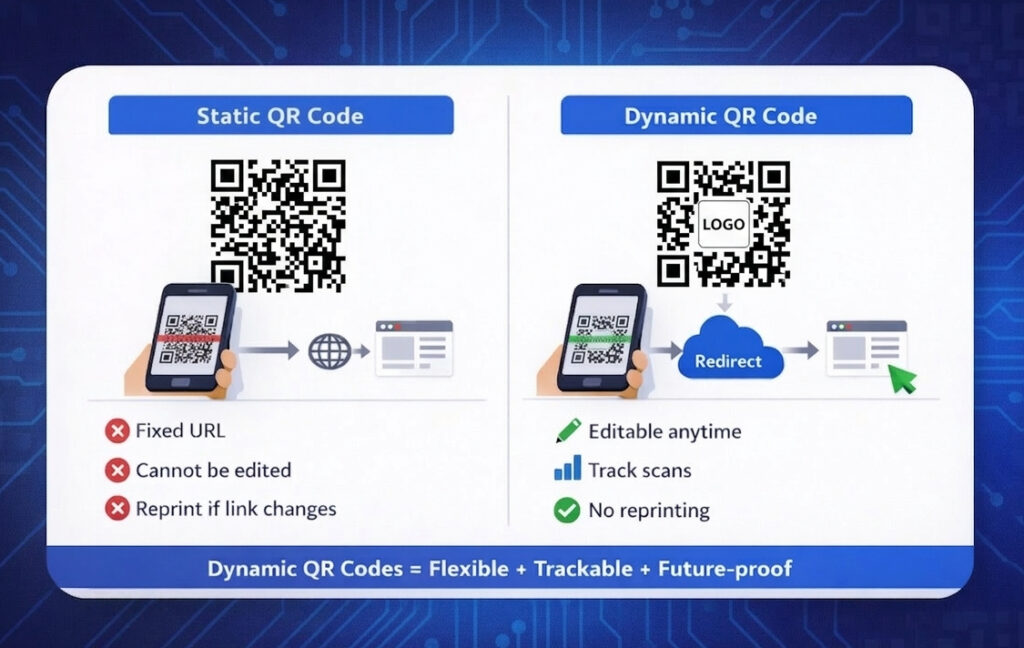
A static QR code stores its destination data – a URL, phone number, Wi-Fi password, plain text, or contact details – directly inside the code’s visual pattern. The information is permanently encoded into the arrangement of black and white squares at the moment of creation.
When someone scans a static QR code, their phone reads the pattern and decodes the data instantly – with no server involved, no redirect, and no intermediary step. The result is direct and immediate.
Key characteristics of static QR codes:
- Data is permanently embedded – cannot be changed after creation
- No tracking or scan analytics
- Works without internet or server access
- Free to create with most QR code generators
- Longer URLs or more data = more complex, denser code pattern
- No account or subscription required to create
💡 The density problem: Because static QR codes encode all data directly into the pattern, longer URLs create visually denser codes with more modules. Longer URLs or more data directly encoded into a static QR code result in a denser, more complex pattern – potentially making it harder to scan, especially when printed small or viewed from a distance.
2. What Is a Dynamic QR Code?
A dynamic QR code works differently at a fundamental level. Instead of encoding your final destination directly, it encodes a short redirect URL hosted by a QR code platform like OpenQR.
When someone scans it, their device sends a request to that short URL. The platform’s server logs the scan, checks the current destination you’ve set, and instantly redirects the user – all in a fraction of a second, completely invisible to the person scanning.
Because the destination is stored on the server – not in the code itself – you can change where the code leads at any time, from any device, without touching the printed material.
Key characteristics of dynamic QR codes:
- Destination URL can be changed unlimited times – even after printing
- Full scan analytics: volume, location, device type, time of scan
- Cleaner, less dense pattern (only a short URL is encoded)
- Requires an account with a QR code platform
- Small monthly cost (OpenQR starts at $5/month)
- Codes never expire with OpenQR, even after subscription ends
✅ Market signal: Dynamic codes now account for 64.35% of all global QR code implementations in 2025 – a clear signal that businesses have voted with their budgets on which type delivers more value.
3. How They Work: The Technical Difference
Understanding the technical difference once makes every future QR decision obvious.
How a static QR code works
- You enter a URL (e.g.
yoursite.com/summer-menu) - The generator encodes that full URL into the QR pattern
- User scans → phone reads pattern → browser opens
yoursite.com/summer-menu - If that URL ever breaks or changes: the code is permanently broken
How a dynamic QR code works
- You enter a URL (e.g.
yoursite.com/summer-menu) - OpenQR creates a short redirect URL (e.g.
oqr.at/abc123) and encodes that into the QR pattern - User scans → phone reads pattern → hits
oqr.at/abc123yoursite.com/summer-menu - If you later change the destination to
yoursite.com/autumn-menuin your dashboard, the same printed QR code now leads there automatically
💡 The redirect is invisible. The user never sees the short URL – they land directly on your destination page. The whole process takes milliseconds.
4. Full Comparison: Static vs Dynamic QR Codes
| Feature | Static QR Code | Dynamic QR Code |
|---|---|---|
| Editable after printing | ❌ Never | ✅ Unlimited times |
| Scan analytics | ❌ None | ✅ Volume, location, device, time |
| Code pattern density | Higher (more data encoded) | Lower (cleaner, faster to scan) |
| Works offline | ✅ Yes – no server needed | Needs internet for redirect |
| Expiry | Never (but link may break) | Never expires with OpenQR |
| Branded design (logo, colors) | Limited | ✅ Full customization (OpenQR) |
| Account required | ❌ No | ✅ Yes (OpenQR – free trial) |
| Cost | Free | From $5/month (OpenQR) |
| Reprint if URL changes | ❌ Yes – always | ✅ Never needed |
| Campaign ROI measurement | ❌ Impossible | ✅ Full data per code |
| Best for business & marketing | ❌ | ✅ Always the better choice |
5. Pros and Cons of Each
✅ Pros
- Completely free to create
- No account or subscription required
- Works without internet access
- Never depends on a third-party server
- Perfect for simple, permanent info
❌ Cons
- Cannot be edited after printing – ever
- No scan tracking or analytics
- Denser pattern = harder to scan at small sizes
- Broken link = wasted print materials
- No way to measure campaign performance
✅ Pros
- Edit destination anytime – no reprinting
- Full analytics: scans, location, device, time
- Cleaner pattern – scans faster and more reliably
- Reuse same code across multiple campaigns
- Full branded design: logo, colors, frame
❌ Cons
- Requires a paid QR code subscription
- Needs internet access to redirect
- Dependent on QR platform staying active
✅ Bottom line on cons: The cost concern is minimal – OpenQR starts at $5/month, far less than a single reprint job. The internet dependency is a real consideration only in remote, offline environments (e.g. field operations, remote retail). For virtually every standard business and marketing use case, the pros of dynamic codes far outweigh the cons.
6. When to Use Static vs Dynamic: Decision Guide
Use this simple framework to choose the right type every time.
✅ Use a static QR code when:
- The information will never change – e.g. a permanent Wi-Fi password, a fixed phone number, a one-time event code
- You need it to work offline – e.g. product labels in remote areas, emergency info in low-connectivity environments
- It’s a personal, one-off use – e.g. a personal contact card, a school project link, a community notice board
- You don’t need any data – if you genuinely have zero need to know how many people scanned or from where
✅ Use a dynamic QR code when:
- You’re printing marketing materials – flyers, menus, posters, packaging, business cards
- The destination might change – seasonal menus, campaign landing pages, rotating offers
- You need to track performance – any campaign where ROI matters
- You want branded design – logo, custom colors, CTA frame
- You’re managing multiple codes – businesses running more than one campaign or location
- The reprint cost would hurt – if getting it wrong means reprinting hundreds of items
⚠️ The one mistake to avoid: Using a static QR code on any printed material that contains information that could change – menus, URLs, promotions, contact details. This is how businesses end up with unusable printed stock and expensive reprints. When in doubt, always use dynamic.
7. Real-World Business Use Cases
Restaurant menus → Dynamic
Menu items, prices, and specials change constantly. A dynamic PDF QR code on table tents lets you update the menu anytime without reprinting. Static would require new table tents every season – or whenever a dish sells out.
Product packaging → Dynamic
Link to how-to videos, recipes, or product registration pages. With dynamic, you can update the linked content after a product launch without touching the packaging. Static codes on packaging become outdated the moment you update your website.
Business cards → Dynamic (usually)
If you change jobs, get a new number, or rebrand, a dynamic vCard QR code means your printed cards stay valid forever. Static is acceptable only if your contact details are guaranteed permanent.
WiFi sharing → Static
This is one of the best static QR use cases. Your Wi-Fi password rarely changes, no tracking is needed, and the code works without any server. A static WiFi QR code on a wall sign is perfectly appropriate here.
Events → Dynamic
Event details change right up to (and during) the day. Speaker schedules update, venue changes happen, last-minute additions occur. Dynamic codes on tickets and posters let you push updates instantly to everyone holding a printed code.
Education / classroom → Static or Dynamic
For a one-semester course where the linked resource (textbook, Google Form, video) won’t change: static is fine. For an ongoing course where links update term-to-term: dynamic saves reprinting posters and handouts every cycle.
Marketing campaigns → Dynamic always
No exceptions. If you’re running a campaign on printed ads, packaging inserts, or outdoor signage, you need analytics to measure ROI. Static codes make this impossible. Dynamic codes give you scan volume, location data, and device breakdown per code.
8. Cost Comparison: Are Dynamic QR Codes Worth It?
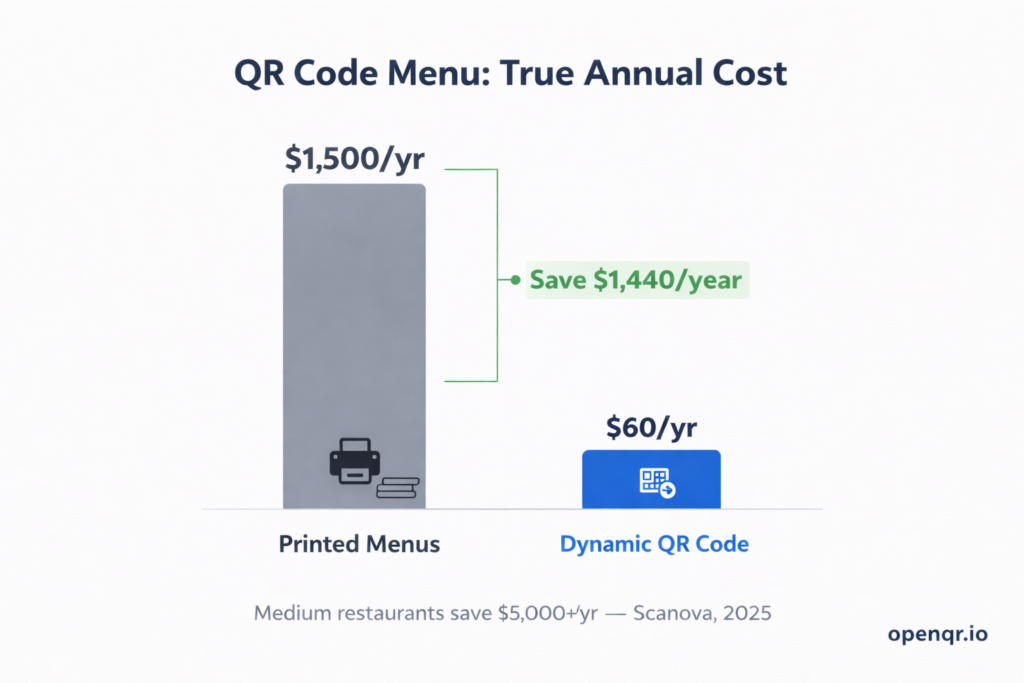
The most common hesitation about dynamic QR codes is cost. Let’s put it in context.
| Scenario | Static QR Code Cost | Dynamic QR Code Cost |
|---|---|---|
| Creating the code | $0 | $5/month (OpenQR Starter) |
| URL changes once → reprint 500 flyers | $150–$400 | $0 (edit in dashboard) |
| URL changes 3× in a year | $450–$1,200 | $60/year total |
| Scan analytics value | $0 (none available) | Included in plan |
| Annual total (realistic business use) | $300–$1,200+ | $60/year |
✅ The math is clear: A single reprint event costs more than an entire year of OpenQR’s Starter plan. For any business printing QR codes on materials that might ever need updating, dynamic codes pay for themselves the first time you avoid a reprint.
9. How to Create a Dynamic QR Code with OpenQR
Getting started with dynamic QR codes on OpenQR takes under 3 minutes:
- Go to openqr.io and click “Try FREE trial” – no credit card required
- Select Dynamic QR and choose your content type (URL, PDF, vCard, WiFi, Location, SMS, etc.)
- Enter your destination – the URL or file you want the code to link to
- Design your code – add your logo, brand colors, and a call-to-action frame
- Download as SVG for print or PNG for digital use
- Edit anytime – log in to your dashboard and update the destination whenever you need
OpenQR’s dynamic codes never expire – even if your subscription lapses, your codes continue redirecting with a brief “Powered by openqr.io” watermark. Your audience always reaches their destination.
10. Frequently Asked Questions
Can you convert a static QR code to dynamic?
No. You cannot switch from a static QR code to a dynamic QR code. Once you select and create a static QR, you cannot change it to a dynamic QR – they are two fundamentally different types. You would need to generate a new dynamic QR code and update your printed materials. This is exactly why choosing dynamic from the start (for any business use) is so important.
Do dynamic QR codes expire?
It depends on the provider. Some platforms disable dynamic codes if you cancel your subscription. With OpenQR, codes never expire – even after a plan ends. This is one of OpenQR’s key advantages over competitors that hold your codes hostage to active billing.
Are dynamic QR codes slower to scan than static ones?
No – in practice the difference is imperceptible. The redirect takes milliseconds. In fact, dynamic codes often scan faster because their patterns are less dense (they only encode a short URL, not a full destination address).
Can I track who scanned my QR code?
Dynamic QR codes track scan data including total scan count, geographic location, device type, and time of scan. They do not identify individual people – only aggregate, anonymous data. OpenQR is fully GDPR and CCPA compliant and does not track user IP addresses.
Is a dynamic QR code the same as a trackable QR code?
Yes – all dynamic QR codes are trackable by definition. Because they redirect through a server, every scan can be logged and reported. Static QR codes have no tracking capability at all, since they don’t involve any server.
What happens to scans if I change the destination?
Your historical scan data is completely preserved. Changing the destination URL in OpenQR does not reset or affect your analytics. All past scans remain in your dashboard and new scans continue accumulating on the same record.
Which is more secure – static or dynamic?
Both are equally secure in terms of the QR code itself. The key difference is that dynamic codes offer more control – you can update or disable a destination if a link becomes compromised, which you cannot do with a static code. OpenQR accounts are password-protected; only the account holder can change destinations.
Ready to Switch to Dynamic QR Codes?
Start your free 14-day trial on OpenQR – no credit card required. Create editable, trackable, branded QR codes in under 3 minutes.