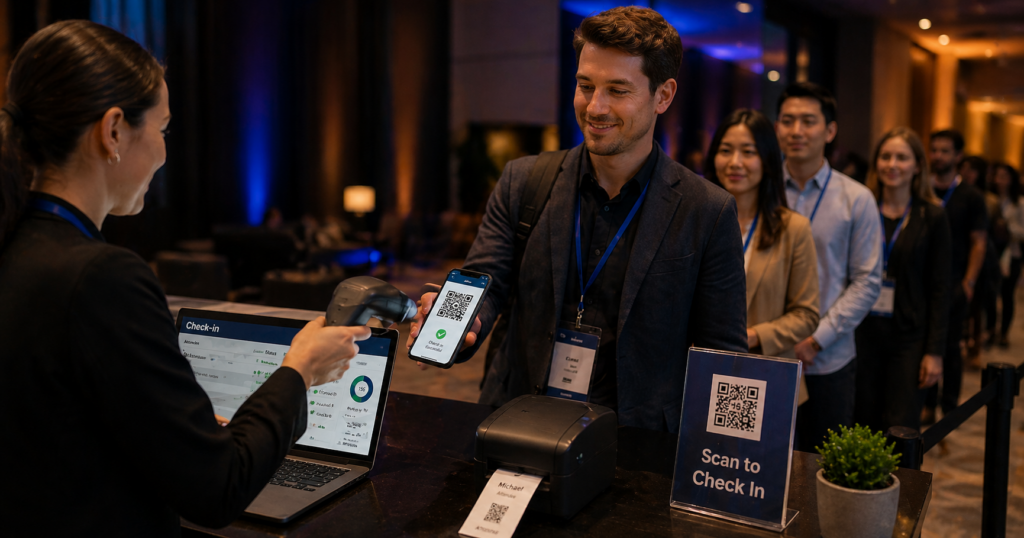
43% of marketers now use QR codes specifically for events – making it the third most common QR deployment channel behind email and product packaging (Bitly, 2025). QR code event check-in reduces average entry time from 12 seconds to 3 seconds per attendee. And QR codes on event materials drive 3x more engagement than directing people to type a URL (Bitly, 2025).
In 2026, QR codes handle the entire attendee journey at events of every scale – from a 50-person corporate workshop to a 50,000-person music festival. Pre-event promotion, registration, check-in, in-session engagement, networking, sponsor activations, and post-event follow-up can all run through QR codes deployed intentionally.
This guide covers every phase of that journey with practical setup instructions, 2026 data, and the specific QR code types that work best for each use case.
- 43% of marketers use QR codes for events – the third most common deployment channel (Bitly, 2025).
- QR check-in reduces entry time from 12 seconds to 3 seconds per attendee (Bizzabo/Cvent data, 2026).
- 31% of consumers scan QR codes specifically to access event tickets – one of the top three consumer scanning motivations (TEAM LEWIS).
- 49% of marketers link their QR codes to event information or registration – the second most common content type (Bitly, 2025).
- Always use dynamic QR codes for events. Event details change constantly – a dynamic code lets you update the destination without reprinting a single badge, banner, or flyer.
- Events adopting QR solutions report attendee satisfaction increases of up to 30%, primarily due to faster entry and a more personalised experience.
- OpenQR’s free 14-day trial lets you create dynamic event QR codes with full analytics at no cost to start.
- Why QR Codes Are Essential for Events in 2026
- Phase 1 – Pre-Event: Promotion and Registration
- Phase 2 – Event Day: Check-In and Entry
- Phase 3 – During the Event: Engagement and Navigation
- Phase 4 – Networking and Lead Capture
- Phase 5 – Post-Event: Follow-Up and Feedback
- QR Codes by Event Type
- How to Create and Deploy Event QR Codes
- Tracking Event QR Performance
- Common Mistakes to Avoid
- Frequently Asked Questions
1. Why QR Codes Are Essential for Events in 2026
The event industry was one of the fastest adopters of QR technology during the pandemic, and unlike many pandemic-era adaptations, QR codes at events stuck. The reason is simple: they solve real operational problems faster and cheaper than any alternative.
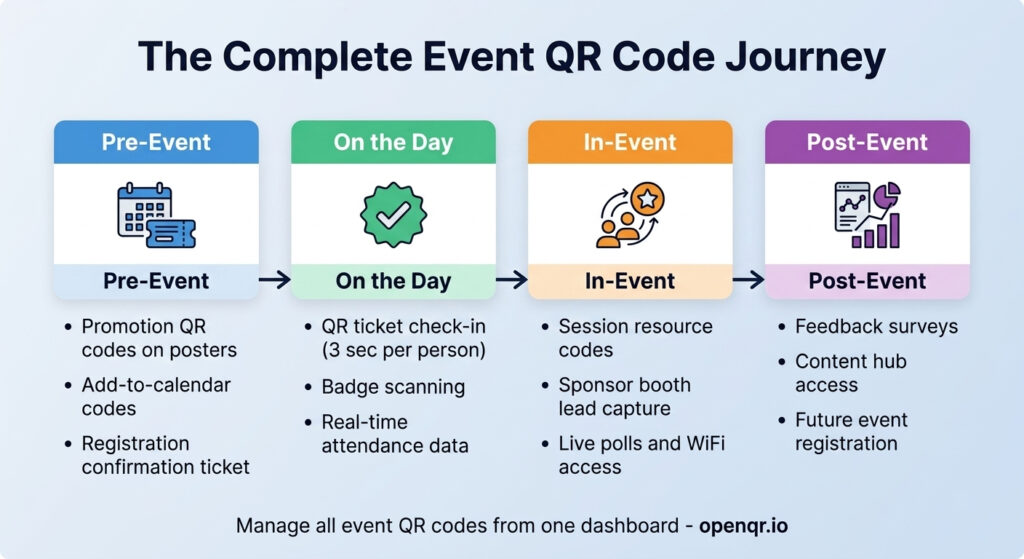
The operational case is strongest at check-in. For a 1,000-person event, cutting entry time from 12 seconds to 3 seconds per attendee saves roughly 2.5 hours of queue time across the entry period. For a 10,000-person event that scales to 25 hours – the difference between a chaotic entrance and a smooth welcome experience that sets the right tone for everything that follows.
Beyond operations, QR codes give event organizers something they have never had before: real-time data on what attendees actually engage with. Which session handouts are being accessed? Which sponsor booths are driving scans? Which content is being downloaded? This data shapes the next event’s programme based on what people did, not what you assumed they would do.
The 2026 shift: Early event QR adoption focused on replacing paper – digital tickets instead of printed ones, digital menus instead of physical programmes. By 2026, the leading event teams are using QR codes as active data collection touchpoints throughout the entire attendee journey, not just entry infrastructure.
2. Phase 1 – Pre-Event: Promotion and Registration
QR codes start earning their place at events before a single attendee walks through the door.
Event promotion
A dynamic QR code on posters, flyers, social media graphics, and email campaigns links directly to your event page. The critical advantage over a printed URL is that the destination can be updated at any time without reprinting. Your poster goes up six weeks before the event – and over those six weeks your event page URL may change, your registration platform may migrate, or you may want to direct traffic to a new early-bird offer. With a static code any of these changes means reprinting everything. With a dynamic QR code, you update the destination in your OpenQR dashboard in seconds.
Registration and ticketing
49% of marketers link their QR codes to event information or registration (Bitly, 2025) – the second most common content type after promotional offers. A QR code on all pre-event materials that links directly to the registration or ticket purchase page removes every barrier between interest and sign-up.
Calendar integration
An event QR code can encode event details – date, time, venue, description – in a format that lets the recipient add the event directly to their phone’s calendar with a single tap. For recurring events, webinars, and conferences this is one of the most genuinely useful pre-event QR applications.
Sponsor and partner promotion
Create unique QR codes per sponsor with separate analytics tracking. Each sponsor’s code links to their designated content and tracks how many attendees engaged with their pre-event materials. This sponsor-level scan data becomes part of your post-event ROI report for each partner.
Use a unique QR code per promotional channel – one for the email campaign, one for the poster, one for social media. All three codes link to the same destination, but they give you channel-level analytics. After the event you see exactly which channel drove the most registrations. That data reshapes how you allocate your promotional budget for the next event.
3. Phase 2 – Event Day: Check-In and Entry
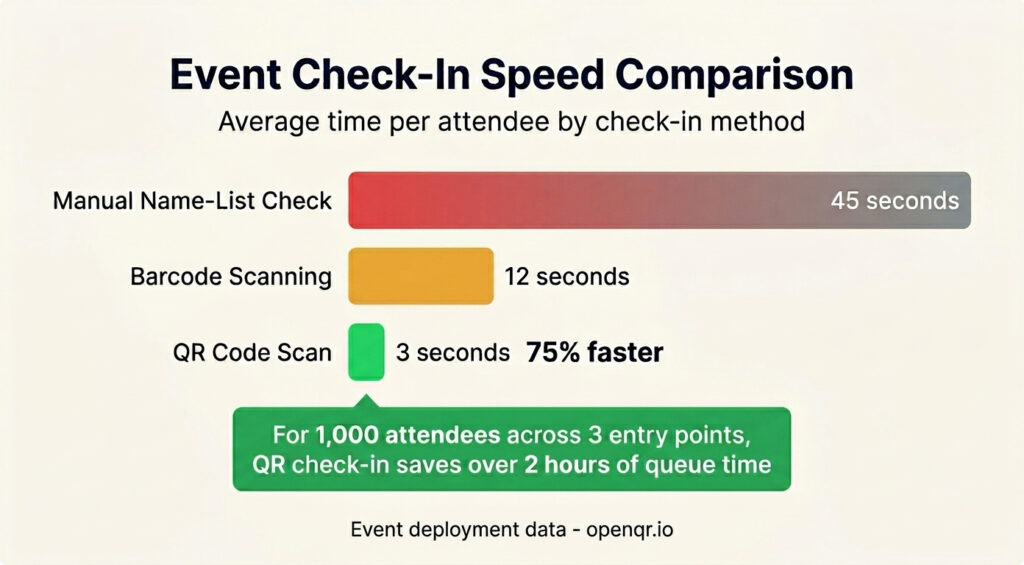
Check-in is where QR codes deliver the most immediate, visible ROI at any event. QR-based check-in reduces average entry time from 12 seconds to 3 seconds per attendee (Bizzabo/Cvent deployment data, 2026). For venues processing 10,000 or more attendees this difference is measured in hours.
How QR ticket check-in works
- Attendees receive a unique QR code after registration – delivered by email, displayed in a confirmation page, or saved to a mobile wallet
- At entry, a staff member or self-service kiosk scans the code
- The system validates the ticket against the registration database in real time
- The attendee is admitted – the code is marked as used to prevent re-entry
- The organizer’s dashboard updates in real time with arrival data
Wristband and badge QR codes
For multi-day events, festivals, and conferences, QR codes on wristbands or badges serve a dual purpose: entry validation and in-event access control. A single scan at a session entrance validates that the attendee has the right ticket tier. The same code on a lanyard becomes a networking tool – scan to exchange contact details without typing anything.
Always have a backup plan for check-in. A QR code scanner that loses internet connection mid-event is a queue problem. Pre-download an attendee list and have a manual name-lookup process ready for any code that fails to scan. Staff should know this protocol before the event starts, not during it.
Cashless payments and age verification
Music festival QR wristbands combining entry, cashless payment, and age verification are projected to be used at 40% of major festivals by 2027, up from 15% in 2023 (Eventbrite/Festival Insights, 2024). The same QR code that admits an attendee can link to a pre-loaded payment account, replacing cash or card at every vendor.
4. Phase 3 – During the Event: Engagement and Navigation
The highest-performing event teams in 2026 treat every scan point inside the event as a data-generating engagement opportunity, not just an operational touchpoint.
📋 Session resources
- Slide decks and presentation PDFs
- Speaker notes and reading lists
- Survey or poll links for live audience response
- Links to speaker social profiles for follow
🗺️ Navigation and wayfinding
- Interactive venue maps at entry points
- Session schedules with real-time updates
- Room capacity indicators updated live
- Directions to specific exhibitor stands
🏢 Sponsor and exhibitor activation
- Unique QR per exhibitor booth for lead capture
- Exclusive offer or discount accessible by scan
- Product demo video or digital brochure
- Competition or prize draw entry
📱 Social and engagement
- Event social wall – scan to add your photo
- Social media follow page for the event
- Live polling and audience Q&A platforms
- Photo sharing gallery updated in real time
Session-level QR codes
Place a unique QR code at the entrance to each session or display it on the first slide of each presentation. Attendees scan to access the session resources – and organizers see exactly which sessions generated the most engagement. A session with 400 scans in the first 5 minutes is objectively more popular than one with 40. This data drives the programme for the next event.
WiFi access
A WiFi QR code at every entrance and throughout the venue eliminates the single most-asked question at any event. One scan connects automatically. This is one of the few cases where a static QR code is appropriate – WiFi passwords rarely change within an event, and no tracking is needed. Sports bars and entertainment venues running live viewing events face the same setup challenges as events – see the sports bar and venues QR code guide for a practical venue-specific playbook.
5. Phase 4 – Networking and Lead Capture
For conferences, trade shows, and corporate events, the value of attending is often the connections made. QR codes make networking frictionless in ways that paper business cards and manual contact entry cannot.
vCard QR codes for attendees and speakers
A vCard QR code on a conference badge or lanyard lets any two attendees exchange full contact details in a single scan. No typing, no dropped cards, no misspelled email addresses. For speakers, a vCard code displayed on the final slide of a presentation lets every interested audience member leave with the speaker’s details already in their phone.
Exhibitor lead capture
For trade shows and exhibitions, each booth should have a unique QR code that logs the scan and directs visitors to a lead capture form, a product page, a discount offer, or a demo booking link. The scan records engagement data. The destination records intent. Combined, these give the exhibitor a qualified lead list with context.
Exhibitors using QR lead capture at trade shows report significantly higher lead quality than those relying on badge swipe or business card collection. The QR scan is an active, intentional action – the visitor chose to engage. That intent signal is more reliable than a badge swipe at entry, which captures presence but not interest.
6. Phase 5 – Post-Event: Follow-Up and Feedback
The event ends but the QR codes keep working. The post-event phase is where dynamic codes deliver value that no static code ever could.
Feedback and surveys
A QR code linking to a post-event survey on exit signage, the closing presentation slide, and in the follow-up email captures feedback at three different moments. Using the same dynamic code across all three placements means you track total response volume in one analytics view.
On-demand session content
Update the destination of session QR codes to link to recorded video after the event ends. The same code that linked to live slides during the event now links to the recording. Attendees who kept the programme or scanned the session card scan again and find the video waiting for them. No new materials, no new codes – just a destination update in the OpenQR dashboard.
Sponsor follow-up and attribution
Post-event, each sponsor’s unique QR code analytics show total scans, geographic distribution, peak scan times, and device breakdown across the event. This data becomes the sponsor ROI report – concrete proof of how many attendees engaged with each sponsor’s activation.
Promotion for future events
Update the destination of your event promotion codes to link to the next event’s registration page. Anyone who kept a flyer, poster, or lanyard from this year’s event becomes a warm prospect for next year’s. Dynamic codes make every printed piece of event material an evergreen marketing asset.
7. QR Codes by Event Type
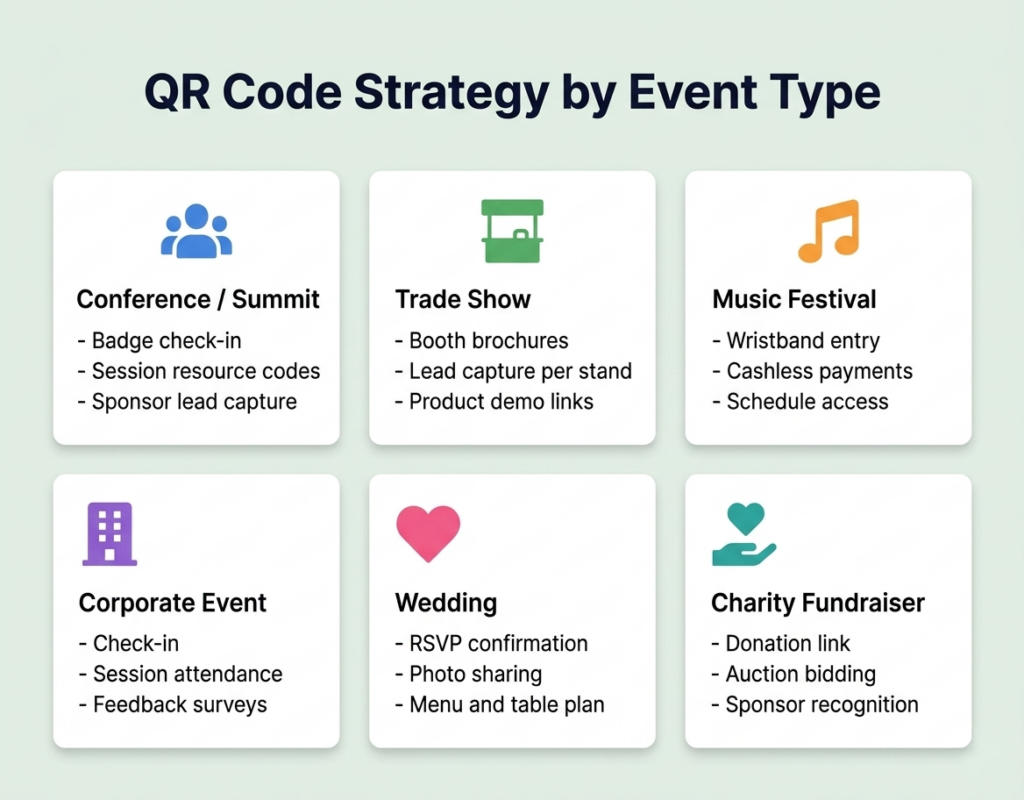
| Event Type | Highest Priority QR Use Cases | Key Metric to Track |
|---|---|---|
| Conference / summit | Session check-in, resource access, networking vCard, feedback | Session scan rate – shows which content drove most engagement |
| Trade show / exhibition | Booth lead capture, product demos, exhibitor analytics | Scans per exhibitor – for sponsor ROI reports |
| Music festival | Wristband entry, cashless payment, schedule access, social wall | Entry scan speed – queue time reduction |
| Corporate event / team building | Registration, WiFi, activity codes, feedback survey | Feedback scan rate – response volume vs attendance |
| Wedding / private event | RSVP confirmation, venue directions, photo gallery sharing, schedule | Photo gallery scans – attendee engagement with shared memories |
| Charity / fundraiser | Donation page, campaign story, social sharing | Donation conversion rate from scan to completed donation |
| Sports event | Ticket entry, concession ordering, merchandise, replay access | Concession scan volume – operational efficiency |
8. How to Create and Deploy Event QR Codes
Step 1: Plan your QR code map before creating any codes
Before generating a single code, list every touchpoint in your event where a QR code will appear. For each, define: what it links to, whether the destination may change, and whether you need to track scans individually. This planning step determines how many codes you need and which plan tier to use.
Step 2: Create all codes in OpenQR as dynamic
Go to openqr.io, start your free 14-day trial, and create a dynamic QR code for each event touchpoint. Use consistent naming – “Conference 2026 – Session 1,” “Conference 2026 – Registration” – so your analytics dashboard stays organised across the event lifecycle.
Step 3: Apply consistent branding across all event codes
Use the same logo, color scheme, and CTA frame style across all codes for a single event. Attendees will encounter multiple codes throughout the day – consistent visual design signals that each code is official and safe to scan.
Step 4: Export SVG for all printed materials
Always export as SVG for badges, banners, signage, and any printed item. Test every code on a physical proof at the intended print size before approving the final print run. See our QR code best practices guide for full print specifications.
Step 5: Brief your team before the event
Every staff member working at a QR-enabled event should understand: what each code does, how to direct attendees to use it, and what to do if a code fails to scan. A 10-minute briefing prevents 80% of on-the-day confusion. Include a backup protocol for check-in failures – a manual attendee list that works without internet.
9. Tracking Event QR Performance
Event QR codes generate some of the richest real-time analytics available in any marketing channel. OpenQR’s scan analytics captures the following during and after the event:
- Real-time scan activity: Watch check-in flow live as attendees arrive – see peak entry windows and identify queue build-ups as they happen
- Session engagement: Which sessions generated the most scans tells you which content resonated most
- Geographic distribution: Where attendees traveled from – useful for understanding your audience reach and planning future event locations
- Device breakdown: iOS vs Android split – useful for optimising mobile destination pages for the dominant device in your audience
- Time-of-scan distribution: When scans clustered – reveals peak engagement moments throughout the event day
Export your scan data from OpenQR to CSV immediately after the event. Combine with your registration data to calculate attendance rates, check-in speed metrics, session engagement rates, sponsor activation scan counts, and feedback response rates. This report serves your internal planning team and your sponsors equally.
10. Common Mistakes to Avoid
Using static QR codes for any event material
Event details change right up until the day – and often during it. A speaker cancels, a room changes, the registration platform migrates. Each of these requires a reprint with a static code. Dynamic codes handle all of these with a 30-second dashboard update.
No CTA on event codes
A bare QR code at a conference does not tell an attendee whether it leads to session slides, a competition entry, a survey, or a sponsor offer. Label every code clearly: “Scan for session slides,” “Scan to enter the prize draw,” “Scan to save my contact details.” Ambiguous codes do not get scanned.
No backup plan for check-in
Connectivity fails at events. A check-in system requiring live internet with no offline fallback creates queue chaos. Always have a downloaded attendee list and brief staff on the manual lookup process before doors open.
Single code for all touchpoints
Using the same QR code on your event poster, registration email, and on-site signage gives you one aggregated scan count with no channel insight. Use separate codes per touchpoint – they all link to the same destination, but their analytics are tracked independently.
Forgetting to update codes post-event
Event promotion codes, session resource codes, and sponsor codes all have a post-event life. Update them to point to relevant follow-up content – the next event’s registration, the session recording, or the sponsor’s ongoing offer. Every piece of printed event material becomes a marketing asset if the code behind it stays live and relevant.
Frequently Asked Questions
What type of QR code should I use for event tickets?
Use a dynamic QR code for event tickets. Dynamic codes let you update linked event information if details change before the event, and they provide scan analytics for check-in tracking. Each attendee should ideally receive a unique QR code linked to their specific registration record – this prevents code sharing and gives you accurate attendance data.
How do I prevent people from sharing their event QR ticket?
The most reliable approach is to generate a unique QR code per attendee registration, with the code marked as “used” after the first scan at entry. For most small to medium events, a practical alternative is to check the ticket against a name on the registration list when the code is scanned – the code proves purchase, the name check prevents transfer.
Can I use the same QR code across all my event materials?
Technically yes, but strategically no. Using a single code across all materials gives you one combined scan count with no channel breakdown. Using separate codes per placement – all pointing to the same destination – gives you channel-level analytics showing which promotional medium drove the most registrations. The extra setup time is typically 10 minutes and the analytical value is significant.
What happens to my event QR codes after the event?
With OpenQR dynamic codes, they keep working indefinitely – codes never expire. Update the destination to point to post-event content: recorded sessions, next year’s event registration, sponsor follow-up pages, or a post-event survey. Any attendee who kept a badge, lanyard, or printed programme can scan the code again and find relevant follow-up content.
How many QR codes do I need for a typical conference?
A practical QR code map for a 200-person conference with 8 sessions: 1 registration/promotion code, 8 session resource codes, 1 venue WiFi code, 1 feedback survey code, and 1 code per sponsor. That is 12 to 20 codes total – well within OpenQR’s Life plan at $11/month for 50 codes.
Do QR codes work in low-light event environments?
Yes, if designed correctly. High-contrast codes (dark on light background) scan reliably in dim lighting. Low-contrast branded codes that look great in daylight can fail under event lighting – always test your codes in the actual lighting environment before the event. Screen-displayed codes scan well in any lighting as the screen provides its own illumination.
Ready to Run Your Next Event with QR Codes?
Create dynamic, branded, trackable QR codes for every phase of your event. Update destinations any time, track engagement in real time, and never reprint because of a detail change. Free 14-day trial, no credit card required.