A shop window is the only QR code a business has that is read through a sheet of glass, from the pavement, by people who are walking past. The glass reflects the street in daylight and turns into a black mirror when the shop is dark, the code is often printed back to front to be read from outside, and the person scanning is a step or two away with a coffee in the other hand. Decide which side of the glass the code goes on and what sits behind it before you order the vinyl, and the window keeps working whether the shop is open or not.
The benefits of using QR codes on shop windows
Window shopping is older than most of the shops doing it. Department stores were turning their windows into displays more than a century ago, because the window is where a passer-by decides whether to come in. A QR code on the shop window adds the part a display never had: a way to act right there on the pavement. Book the haircut, claim the discount, watch the property tour, see the opening hours, follow the shop. It improves the customer experience for the people who are interested but not ready to walk in, which is most of the people who stop at a window.
It also lets you measure your window for the first time. Every scan is counted by day and time, so you can see whether the new window display gets more attention than the last one, and how many scans arrive after closing. And because window graphics are vinyl or printed panels that stay up for months, a dynamic QR code keeps the decal on the glass while the offer, the listing or the booking page behind it changes as often as you like.
What a window QR code has to handle
Glass between the code and the camera
In daylight the glass reflects the street, the sky and the person scanning. A code mounted behind the glass has to be read through that reflection, and the angle of the sun decides whether it scans at 10 am or only at 4 pm.
Whatever is behind it
A code on clear vinyl takes its background from the shop interior. A bright interior at night lights it from behind, a dark interior in the day turns the glass into a mirror, and a busy display behind the decal shows through the light modules.
Pavement distance, at walking pace
People read a window from the far side of the pavement and stop a step or two from the glass. The code has to be large enough to notice from the kerb and placed where someone can reach it without leaning over a planter or a bike rack.
Sun, rain and window cleaners
Decals on the outside face weather, squeegees and stickers from passers-by. Decals on the inside are protected but fade in direct sun. A window code lasts months, so the material matters as much as the design.
QR solutions that work best on a shop window
Three mistakes that stop a window QR code scanning
A code printed on clear vinyl
Clear vinyl looks clean on the glass and leaves the code with no background of its own. The light modules show the shop interior, a display or the dark behind the glass, and the camera loses the contrast it needs. Print a solid white patch behind the code, even on an otherwise clear decal.
Mounted inside but printed to be read from inside
A decal applied to the inside of the glass and read from the street has to be printed mirrored, so it reads correctly from outside. A QR code printed the right way round for the inside reads backwards from the pavement, and most phone cameras will not scan a mirrored code.
Too low, too high or behind the display
Codes near the bottom of the glass end up behind planters, bikes and condensation. Codes up at the fascia need a phone held over the head. Keep the code between 1.2 and 1.6 m from the pavement, on a clear area of glass, not behind the mannequins.
WHAT TO LINK FROM YOUR SHOP WINDOW
One code. Endless ways to use it.
Pick the right QR type for the job – dynamic codes stay editable and trackable long after the decal is on the glass.
Book now, straight from the pavement
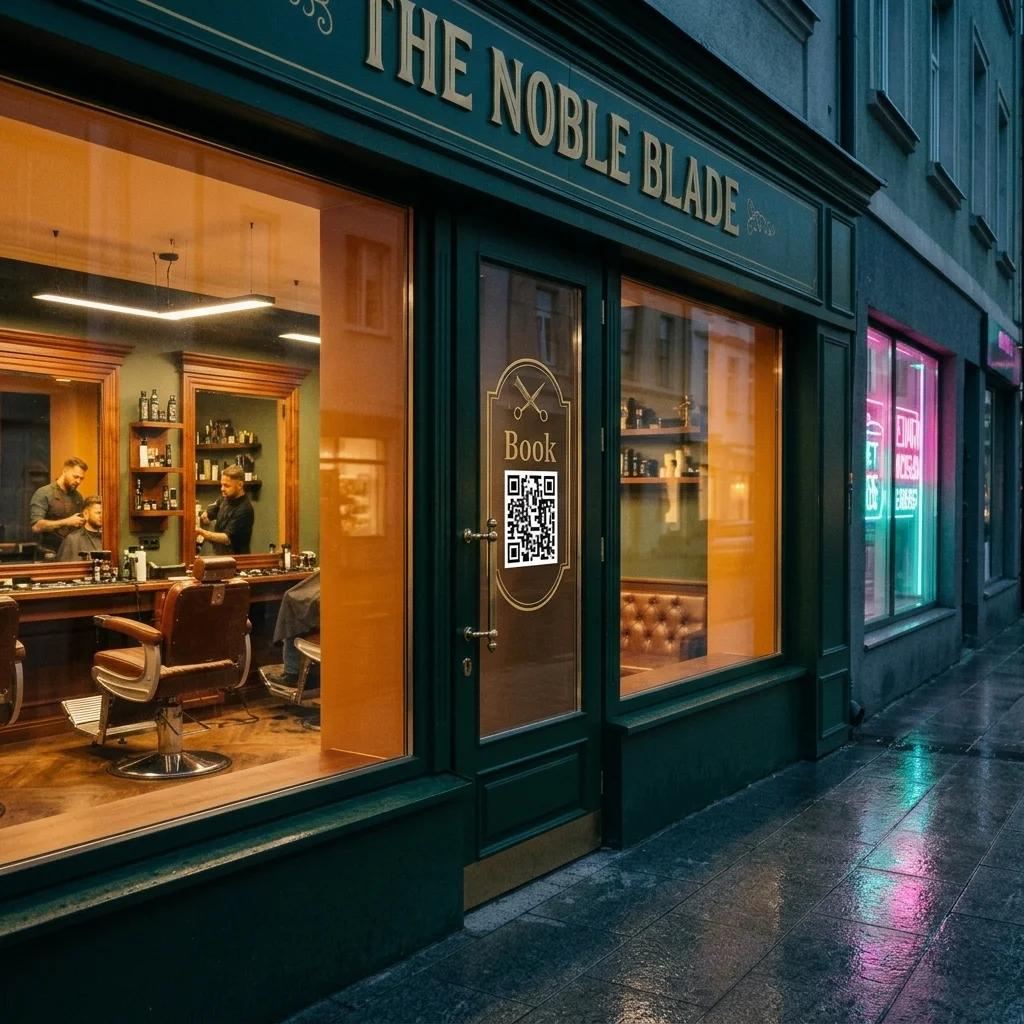
Barbers, salons, nail studios and clinics fill their diary from passers-by. A code on the window opens your booking page with the next free slots, so someone who stops to look can book before they walk on, even on a Sunday.
USES: URL QR CODEThe offer in the window, in their pocket
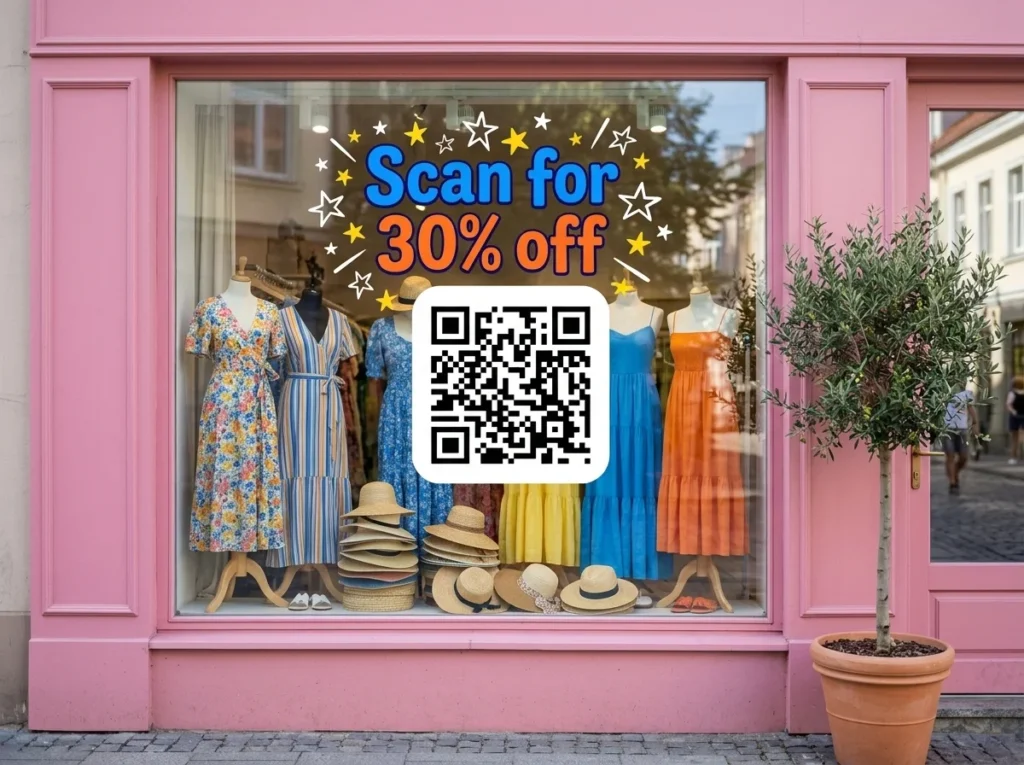
Put the code next to the window offer and send the scan to the coupon or a sign-up form for in-store deals. When the promotion changes, change the page and keep the decal, so the window never advertises an offer that has ended.
USES: URL QR CODEProperty listings that keep up
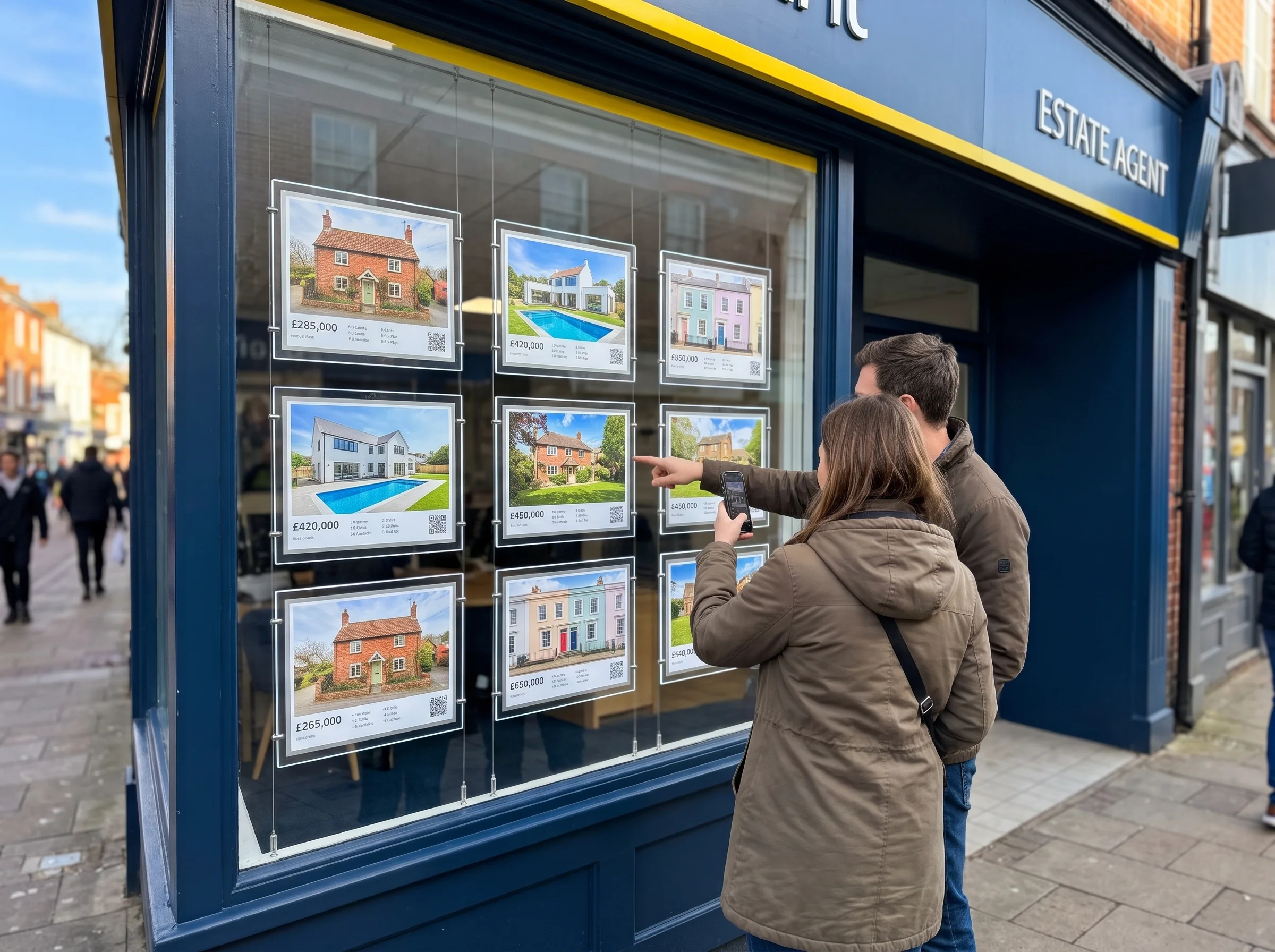
Estate agents change the window every week. Give each property card its own code that opens the listing, the photos and the video tour, and redirect it when the property sells instead of leaving a dead link in the window.
USES: URL QR CODEFollow the shop, not just the window
A social media QR code on the door opens one page with all your profiles. People who like the window display follow you on the spot and see the next one before it goes up.
USES: SOCIAL MEDIA QR CODECall before you come in
Bakeries taking custom orders, repair shops and agencies get questions from people outside the opening hours. A phone QR code puts your number in the dialler, ready to press, so the question becomes a call during opening hours.
USES: PHONE QR CODEMaps, guides and timetables for visitors
Tourist offices, galleries and city information points close before visitors stop arriving. Upload the walking map, the events guide or the timetable as a PDF and OpenQR hosts it, ready for the person reading the window at 8 pm.
USES: PDF QR CODEWITHOUT OPENQR
- Clear vinyl, so the shop interior shows through the code
- Printed the wrong way round for a decal mounted inside
- The street reflected across the code every sunny afternoon
- A sold property or an ended offer still in the window
WITH OPENQR
- White patch behind the code on every decal
- Mirrored print for inside mounting, checked from the pavement
- Placed where the reflection is weakest, tested at different times
- Edit the destination, keep the decal on the glass
What goes wrong with QR codes on shop windows
Shop windows fail on the glass before anything else. A code on a sheet of paper has one surface; a code on a window has the glass, the reflection of the street on it, and whatever is on the other side. Window decals are often printed on clear vinyl to look minimal, which leaves the code’s light modules showing the shop interior. Decals fixed inside are often printed the wrong way round for reading from outside. And because the glass reflects the opposite side of the street, a code that scans perfectly in the morning can be unreadable when the afternoon sun hits the buildings across the road.
The second problem is that windows change and decals do not. Window displays rotate every few weeks, offers end, properties sell and opening hours change for the holidays, but the vinyl on the glass is fitted once and stays up for months. A static QR code on that vinyl points at whatever was true on the day it was fitted. A dynamic QR code keeps the decal and moves the destination, so the window always opens the current offer, the current listing or the current hours, and the scans show which window display actually stopped people.
Inside or outside the glass
Every window QR code is either on the outside face of the glass, on the inside face read through it, or on something standing behind the glass. Each one behaves differently in daylight and at night, so choose the mounting before you design the decal.
| Mounting | How it is printed | Good for | Watch for |
|---|---|---|---|
| Vinyl decal on the outside face | Normal, reads directly | The clearest scan, no reflection over the code | Rain, window cleaners, peeling and vandalism |
| Vinyl decal on the inside face | Mirrored, with a white layer behind the code | Protected from weather and cleaning | Reflection of the street on the glass in front |
| Static cling on the inside | Mirrored | Short campaigns, easy to swap | Lifts at the corners in sun and condensation |
| Poster or card behind the glass | Normal, facing out | Estate agents, menus and notices that change weekly | A gap between glass and poster doubles the reflection |
| Stand or sign inside the window display | Normal | Codes that belong to the display, for example a product | Too far behind the glass to scan from the pavement |
| Door glass | Either, at hand height | Opening hours, booking, contact | Hands and push plates over the code |
Whatever the mounting, the code needs its own light background. On a clear or frosted decal, ask the printer for an opaque white layer behind the code area, and on a dark tinted window make that patch larger than the quiet zone so the edge of the code is not lost against the tint. A code that relies on the shop being lit behind it will fail every morning before the lights go on. Our guide to QR codes with a transparent background explains why the light modules need something solid behind them.
Where on the glass: height, distance and reflections
Size the code for where people stop, not where they first see the window. Scanning distance divided by ten gives the size: a door scanned from half a metre needs 50 mm, a window read from the pavement at about a metre needs 100 mm, and a wide pavement where people stop two metres back needs 200 mm. A window seen from across the road is a different job, so put a short web address in large type there and keep the code near the door. The full distance rule is in our guide to QR codes on posters.
Place the code between 1.2 and 1.6 m from the pavement, where a phone is held level, and on a part of the glass with nothing directly behind it. Beside the door is usually best, because everyone who stops ends up there. Then deal with the reflection. Stand where a customer would stand and look at the glass at different times of day: the street opposite, a white van or the sky will be mirrored across part of the window. Put the code where the reflection is darkest, which is often the lower half of the pane or beside an awning, and if the shop faces the afternoon sun, test it at that hour.
Say what the scan does in large letters next to the code, readable from the kerb: scan to book, scan for 30% off, scan for opening hours. A frame in your colours with that line and your logo in the centre makes the code part of the window design. For the line itself, see how to write a call to action QR code, and if you want your own name in the short link the code opens, see how to create QR codes with a custom domain.
One decal, a window that keeps changing
Window vinyl is fitted once and stays up for months, while the window around it changes all the time. Plan what the code opens for each of those changes, so the decal never points at something the window no longer shows.
| What changes | What the code should open |
|---|---|
| A new window display every few weeks | The products in the current display |
| An offer or a sale ends | The next offer, or the shop page |
| A property is sold or let | Similar properties, or the agent’s current listings |
| Holiday and seasonal hours | A page with this week’s hours, kept up to date |
| The shop is closed for the evening | The online shop or the booking page |
| The business moves or rebrands | The new address or the new website |
For a window with several codes, such as an estate agent’s property cards, name each code after what it is on, so the dashboard shows which listing gets scanned and which window display brings the most scans. Trackable QR codes explains what each scan records, and whether a code on the glass can ever stop working is answered in do QR codes expire. For the shop floor behind the window, QR codes for retail covers signage, shelves and selling after hours, and QR codes for real estate covers listings. Small decals on doors and counters are covered in QR codes on stickers and labels.
Make the code dynamic before the vinyl is cut. A static QR code encodes the destination in the pattern, so it cannot be changed once the decal is on the glass and it cannot be converted to dynamic later. See static vs dynamic QR codes for the difference, and our guide to print QR codes for file formats.
Then test it on the glass, not on the proof. Tape a full-size print to the window in the position you chose, step back to where people stop on the pavement, and scan it on two phones, one of them a few years old, at three times: morning, mid-afternoon with the sun on the street, and after dark with the shop lights off. If it fails at any of those, move it before the vinyl is ordered.
Clear vinyl and tinted glass need an opaque white patch. Never rely on the shop lights.
A decal read through the glass must be printed back to front. Check it from outside.
Size for where people stop. Place it 1.2 to 1.6 m high, beside the door.
Reflections move with the sun. Scan the real glass at three times of day.