A GS1 QR code generator turns product data into one standards-based scan
A GS1 QR code is a QR code that contains a GS1 Digital Link URI: a web address with your product identifiers written into it. The GTIN sits after /01/, and any application identifiers follow as parameters, so /01/09506000134352?10=BATCH123&17=261231 carries the GTIN, the batch number and the expiry date in one pattern. That structure is why a single square serves two very different readers. A till reads the identifiers and rings the item up. A shopper’s phone camera opens the URL and lands on a page you control.
OpenQR.io assembles that URI for you. Enter the GTIN, add the identifiers you need, and the string is built against the Digital Link syntax instead of typed by hand and hoped over. The static download is free, with no account and no expiry, and you can check every value against our GS1 application identifier list before it reaches artwork. Paid plans add dynamic codes from $5/month: the printed pattern stays fixed while the page behind it changes, with QR code scan tracking by day, city and device and expiry date on codes already on pack.
No credit card required

Build a GS1 Digital Link QR code in 3 steps
One thing has to be in place before you start: a GTIN licensed to your company through your local GS1 Member Organisation. Application identifiers are optional and depend on what your trading partners ask for. Everything after that takes about a minute.
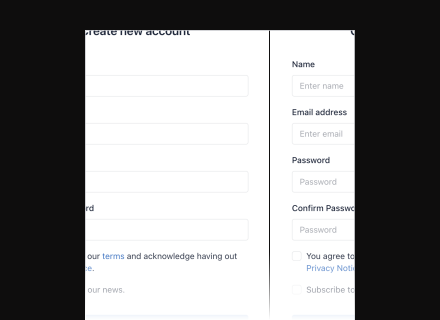
Create account, enter your GTIN and application identifiers
Type the 14-digit GTIN into the field above. Then add only the identifiers the product actually needs: AI 10 for batch or lot, AI 17 for expiry in YYMMDD, AI 21 for a serial number, AI 00 for an SSCC on a pallet label. The order and the formatting are handled for you, so you are not hand-building a query string and finding out at receiving that a scanner could not parse it.
Try 14-day FREE trial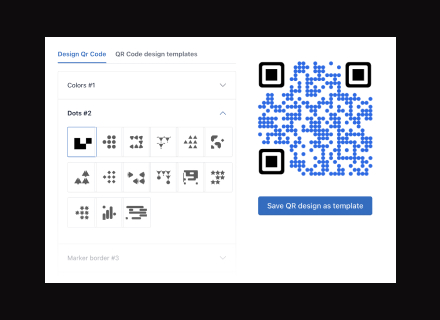
Style it without breaking the scan at print size
GS1 codes print small. The General Specifications put the module size for point-of-sale scanning between 0.396mm and 0.990mm, which at 29 modules is a code roughly 14.7mm to 36.6mm square. Brand colours and a centre logo fit inside that, but a logo raises the error-correction level and packs the grid tighter. Watch the preview, keep dark modules on a light background, and leave the four-module quiet zone empty.
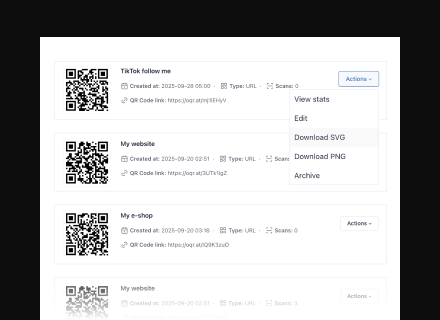
Download and deploy your GS1 QR code
Download SVG for artwork. It is vector, so your repro house can place it at the exact module size without the edges softening, and PNG stays for digital use. Before the job goes to plate, scan the proof at final size with a phone and, if you can get near one, with a POS scanner. A Digital Link that resolves to a 404 is a broken code even when the pattern itself is perfect.
Where GS1 QR codes end up
Retail food packaging
One code on front of pack doing the work the EAN does on the back: the till reads the GTIN, the shopper gets ingredients, allergens and provenance. Sunrise 2027 is about checkout scanners being able to read 2D, not about linear barcodes becoming illegal, so most brands print both through the overlap.
Fresh and variable-weight items
Loose produce and counter-weighed goods, where net weight and pack date change per unit. Measurement identifiers use a fixed six-digit field and the last digit of the AI sets the decimal place, so AI 3102 with 000152 means 1.52kg. Pick the wrong digit and the scale reads a different number.
Pharmaceutical secondary packaging
Cartons carrying GTIN, expiry, lot and serial. The regulated carrier there is usually GS1 DataMatrix, which a phone camera will not open, so the Digital Link QR code sits beside it as the patient-facing layer: leaflets, authenticity checks, dosing instructions in the right language.
Cosmetics and personal care
Narrow tubes and small panels where there is barely room for one symbol. A single Digital Link carries the GTIN for checkout and the batch code a recall would need, instead of printing a linear barcode and a separate marketing QR code on a surface that cannot hold both at a readable size.
Shipping and logistics labels
Case and pallet labels built around AI 00, the 18-digit SSCC, rather than a consumer GTIN. Large grocery retailers already require GS1-128 case labels and SSCC pallet labels from suppliers, and a mistyped SSCC turns into a receiving exception and a chargeback at the dock.
Wine, spirits and provenance
Bottles where the story sells the product: estate, vintage, harvest date under AI 7007. Labels are printed years before the bottle is opened, which is the clearest case for a destination that can move. The award the wine wins in 2028 was not on the label in 2026.
How OpenQr helps you
Packaging artwork is the most expensive place in the business to be wrong. These are the three reasons brands route GS1 codes through OpenQR rather than a one-off encoder.
See scans by market, not one running total
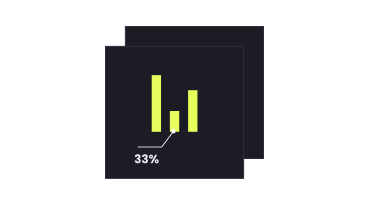
Each scan of a dynamic Digital Link is logged with date, city and device. On a SKU that ships into several countries, that shows you which markets actually scan the pack and which ignore it, which is the number someone will ask for before signing off the next artwork revision.
How OpenQR scan tracking works
Brand the code without losing the till scan
Colours, module shapes and a centre logo, judged against the size the artwork will really print at. The preview redraws as you go, so you can see the grid tighten when the logo drops in and back it out yourself rather than hearing about it from prepress. Contrast and the quiet zone stay protected.
GS1 application identifier list
Change the landing page, not the plates
The GTIN and the identifiers are structural, they belong to the product. What sits behind the resolved URL does not. A dynamic code lets the consumer page move from launch campaign to recipe hub to recall notice while the carton stays exactly as printed. A static code fixes the destination in the pattern, so changing it means new artwork and new plates.
Compare static and dynamic QR codesNo credit card required